

Advisors need one system where behavioral signals, pre-send approvals, and archiving live together, so the CRM shows real engagement data and compliance can pull a single audit export on demand. Done right, this fixes three problems at once: better lead conversion, faster exam response, and less advisor time wasted chasing cold prospects. Start now by routing every marketing template through a documented compliance approval and logging it before it ever reaches a client inbox.
TL;DR:
- An integrated system combining behavioral signals, pre-send approval logging, and archiving streamlines compliance and improves lead conversion.
- The integration must provide visible behavioral data in the CRM, automatic lifecycle automation, and a unified export of content, approval, and recipient records.
- Regulators require documented pre-send approvals, retention of full communication records, and instant unsubscribe sync to ensure compliance and audit readiness.
- Small firms can implement this in three phases over a few months, starting with manual controls, then system connection, and finally full automation of engagement and lifecycle triggers.
- Vendors should demonstrate a sample audit export and support two-way sync, with a focus on compliance features rather than just marketing automation upgrades.
Table of Contents
- Why the CRM-to-Email Gap Is Common and What It Costs Your Practice
- Key Features and Capabilities an Advisor Needs From Integrated CRM and Email Workflows
- Compliance and Supervision: What Regulators Expect and How Integration Helps
- Practical Integration Approaches and a Phased Rollout for Small Firms
- How to Choose an Integration Path or Consultant
- What Advisors Who Get This Right Actually Do Differently
- Why This Belongs on Your Strategic Priority List, Not Your Someday List
- Get a Compliant CRM and Email System Built for You, Not Bolted Together
- Where This Guidance Comes From
- Sources
- FAQ
Why the CRM-to-Email Gap Is Common and What It Costs Your Practice
CRMs and email platforms were built for different jobs. Your CRM exists to manage client relationships and hold records regulators expect to see. Your email platform exists to nurture prospects and measure how they respond. Neither was designed with the other in mind, and that mismatch creates a blind spot most advisors don't notice until it costs them a client.
Here's what typically gets stranded inside the email platform, invisible to the advisor who actually needs it:
- Email opens and click patterns that signal buying intent
- Webinar registration and attendance behavior
- Content downloads tied to specific topics (retirement planning, tax strategy, estate transfer)
- Unsubscribe and suppression events that should update client status everywhere, not just in one system
The operational cost shows up in three places. First, warm prospects go cold because nobody on the advisory side saw the signal. A prospect who opens five consecutive emails about required minimum distributions is telling you something, but if that data sits in a marketing dashboard the advisor never checks, the moment passes. Second, advisors repeat work that should already be done, calling leads who unsubscribed weeks ago or pitching a service the prospect already downloaded three guides about. Third, and most expensive over time, audit prep turns into a scavenger hunt. When emails live in one system, approvals in another, and recipient lists in a spreadsheet nobody updated since March, firms storing these records separately often spend days assembling documentation that an integrated archive could produce in hours.
Key Features and Capabilities an Advisor Needs From Integrated CRM and Email Workflows
Not every integration project needs to solve everything at once, but certain capabilities are non-negotiable if you want the system to hold up under both business pressure and regulatory scrutiny.
- Behavioral fields visible inside the CRM. Opens, clicks, webinar attendance, and content downloads should appear as CRM fields an advisor sees during a call, not as a separate report someone has to remember to pull.
- Lifecycle automation tied to client status. When a prospect becomes a client, marketing sends should stop automatically. When a client status changes (transferred assets, closed account), suppression should trigger without a human remembering to flip a switch.
- Pre-send approval logged against every message. Every promotional email needs a documented reviewer, a timestamp, and a record of what was approved, tied to content type and audience segment.
- Unified archiving that joins three pieces. Message content, the recipient list, and the approval record need to export together as one package, not three files an assistant has to reconcile by hand.
- Two-way unsubscribe sync. If a client unsubscribes in the email platform, the CRM needs to know immediately, and vice versa. A one-way sync is how compliance violations happen by accident.
Pro Tip: Ask any vendor or consultant to show you a sample audit export before you sign anything. If they can't produce one export containing content, recipients, and approval sign-off in under five minutes, assume your team will be stitching that together manually during your next exam.
Compliance experts increasingly frame pre-send approval as a systematic requirement rather than a reactive check, and that shift matters. Reactive review means someone catches problems after the fact, if they catch them at all. Systematic review means nothing goes out the door without a logged sign-off, which is the difference between hoping you're compliant and being able to prove it.
Compliance and Supervision: What Regulators Expect and How Integration Helps
The SEC's marketing rule guidance for investment advisers requires firms to retain marketing records and maintain documented supervisory policies, not simply keep a send log somewhere. That distinction trips up a lot of independent advisors who assume their email platform's built-in reporting satisfies the requirement. It doesn't. Supervisory review means someone with authority approved the content before it went out, and that approval needs to be recorded alongside the message itself.
FINRA Rule 2210 adds another layer for firms operating under broker-dealer affiliation, setting content standards and supervisory controls that apply directly to email templates and review procedures. Together, these frameworks point toward the same operational pattern:
- Every piece of promotional or performance-related content gets pre-send approval
- Approval records capture who reviewed it, when, and against what content type
- Exception reporting flags anything sent without proper sign-off
- Recordkeeping covers the full package: message, recipients, and approval, not just delivery confirmation
The exam-readiness gap is real and it's measurable in time, not just risk. Firms that keep sends, approvals, and recipient lists in separate systems routinely burn days pulling together documentation for an examiner. An integrated stack that ties those three elements together can produce the same package in a matter of hours, because the export already exists in one place instead of three.
That single-export capability is the practical payoff of integration. It's not about avoiding violations you weren't going to commit anyway. It's about being able to prove, quickly and completely, that your supervision process actually works the way you say it does. A structured compliance review workflow built around this principle turns an exam from a scramble into a formality.
Practical Integration Approaches and a Phased Rollout for Small Firms
You don't need a six-figure technology overhaul to fix this. A pragmatic three-phase path works for most independent practices and small RIAs, moving from stopgap controls to full automation over roughly a quarter or two.
- Phase 1, days 0 to 30: stop the bleeding. Appoint a single reviewer for every marketing template. Route all sends through that person before they go live. Pull a weekly manual export of engagement data (opens, clicks, unsubscribes) and cross-check it against your CRM. Enforce unsubscribe handling immediately, even if it's still a manual process for now.
- Phase 2, days 30 to 90: connect the systems. Move to a platform or middleware layer that attaches approval records directly to each send and syncs key client fields between CRM and email tool automatically. Many firms use API-based connections, sometimes through middleware like Zapier or MuleSoft, to link marketing platforms with portfolio and compliance systems without a full rebuild.
- Phase 3, 90 days and beyond: automate the handoff. Surface behavioral scoring directly inside the CRM so advisors see engagement without opening a second dashboard. Automate lifecycle triggers (webinar attendance creates an advisor task, client conversion triggers immediate stop-send and archival). Eliminate manual CSV exports entirely.
A sample workflow looks like this: a prospect attends a webinar, their engagement score updates automatically, and the CRM generates a follow-up task for the advisor within 24 hours, with the webinar behavior logged as context. On the other end, when a prospect signs as a client, marketing sends stop instantly and the full record archives without anyone touching a spreadsheet. That's the lead capture handoff most firms are missing today.
How to Choose an Integration Path or Consultant
Three criteria separate a system that will hold up under an exam from one that will fall apart the first time someone asks for records. Look for genuine API-based two-way sync, not a one-way feed that updates only when someone remembers to run it. Confirm the platform can produce a single audit export combining content, approvals, and recipient lists in one file. And ask whether supervision workflows are documented in writing, not just assumed because "the software handles it."
When you're interviewing a consultant or vendor, ask directly:
- Can you show me a sample audit export right now, live, on this call?
- How does unsubscribe status sync between the CRM and the email platform, and how fast?
- Who at your company has actually built a supervision workflow for a regulated financial firm before?
- What happens to approval records if we switch platforms in two years?
Red flags show up fast if you know what to listen for. Walk away from anyone who relies on manual CSV exports as the primary sync method, who has no answer for approval logging, or who can't export recipient lists tied to the approval that authorized sending to them.
On budget, prioritize the audit export and approval logging first. Behavioral scoring and lifecycle automation are valuable, but they're upgrades. Compliance readiness is the floor, and it's also the checklist item examiners ask about first. A useful general framework for sequencing this kind of rollout appears in this marketing automation checklist for growing businesses, which lays out a similar buy-first, automate-later order of operations.
What Advisors Who Get This Right Actually Do Differently
Advisors who successfully integrate CRM and email systems tend to treat the project as a compliance initiative with a marketing benefit attached, not the other way around. That framing changes everything about how the rollout gets built and who signs off on it.
Mastermind Advisor Marketing was founded and is staffed by people who have grown real advisory practices, which shapes how integration projects here get sequenced: compliance controls first, behavioral intelligence second, automation last. The outcomes firms report after that sequence tend to cluster around three things: faster handoff from marketing to advisor when a prospect shows buying signals, audit-readiness that turns exam prep into a same-day task instead of a week-long scramble, and improved conversion because advisors are working warm leads instead of cold ones. For a deeper look at how the campaign side of this fits together, the financial advisor email campaign setup guide walks through the build step by step.
Why This Belongs on Your Strategic Priority List, Not Your Someday List
Most advisors treat CRM and email integration as an IT cleanup project. It's actually a revenue protection decision. Every unsupervised send is exam exposure, and every warm prospect an advisor never sees is a client who ends up somewhere else. A firm that fixes the handoff between systems typically sees its advisors spend less time re-qualifying leads and more time in front of prospects who already raised their hand.
— Josh
Get a Compliant CRM and Email System Built for You, Not Bolted Together
Mastermindadvisormarketing is the alternative to piecing this together yourself with a patchwork of plugins and a compliance officer improvising as they go. Instead of guessing which middleware connects to which platform, you get a system built by people who have run advisory practices and designed the webinar-to-CRM-to-email pipeline around what regulators actually ask for.
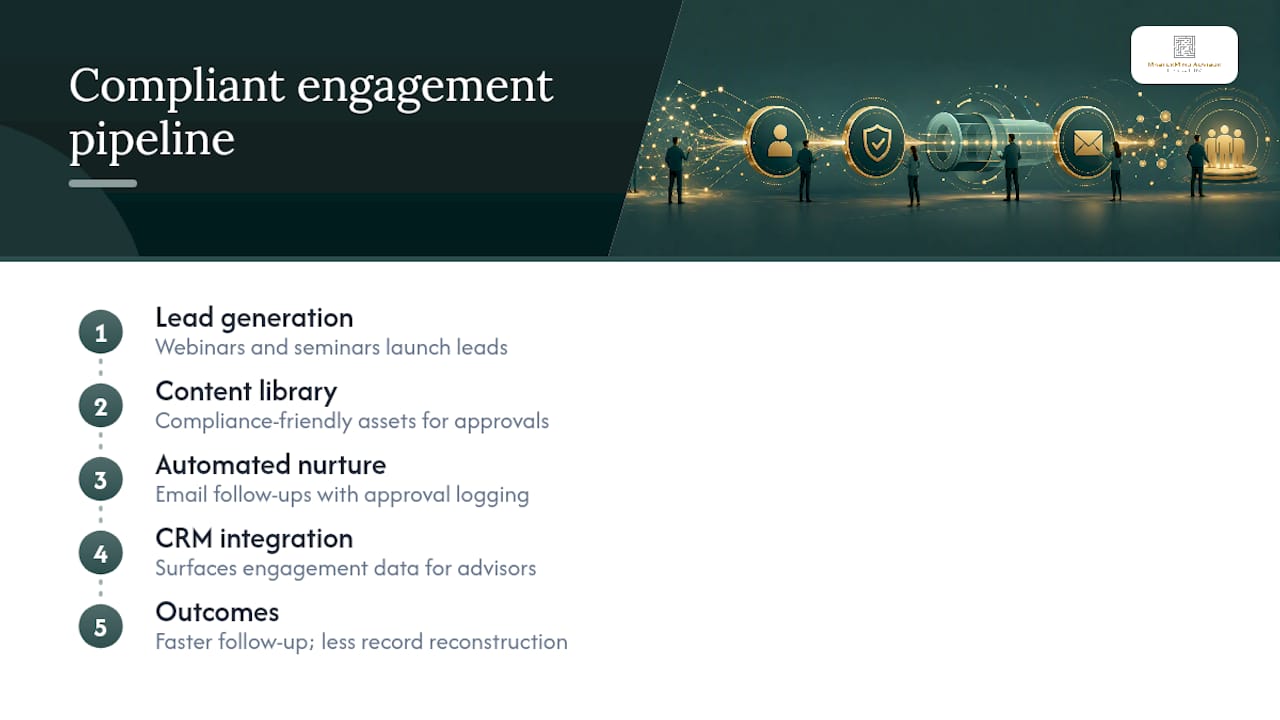
The engagement covers the full loop: lead-generation webinars and seminars, a compliance-friendly content library, automated email follow-ups, and integration with a custom CRM that surfaces engagement data where advisors actually work. Typical phases move from webinar or seminar launch, to automated nurture sequences with approval logging built in, to a CRM view where advisors see who's engaged and ready for a call. Firms that follow this sequence report faster follow-up on warm leads and less time spent reconstructing records under deadline pressure.
If your current setup can't produce a single audit export in minutes, or your advisors are still working leads blind, start with a look at the full services overview and book a conversation about what a managed build would look like for your practice.
Where This Guidance Comes From
The compliance framework in this article draws directly from the SEC's marketing rule guidance for investment advisers and FINRA Rule 2210, both of which set the recordkeeping and supervision baseline every advisor operates under. For the phased rollout logic, see this breakdown of what the SEC marketing rule actually requires. To put approvals and disclosures into a working checklist, use the independent advisor compliance marketing checklist.
Sources
- SEC marketing guidance for investment advisers
- FINRA Rule 2210
- Regulatory-focused financial services email marketing guidance
- Email marketing for financial advisors: what the SEC marketing rule actually requires
FAQ
What Does CRM Email Integration Mean for Advisors?
It means your CRM and email platform share data both ways, so behavioral signals like opens and clicks show up where advisors work, and compliance can pull one audit export instead of assembling records from three systems. The goal is a single source of truth for engagement and supervision.
Is Email Archiving Legally Required for Financial Advisors?
Yes. The SEC's marketing rule guidance requires investment advisers to retain marketing records and document supervisory review, and FINRA Rule 2210 imposes similar content and supervision standards on broker-dealer affiliated communications.
How Long Does a Full CRM and Email Integration Take?
Most small firms can move through a three-phase rollout in roughly one to three months, starting with manual approval controls and ending with automated lifecycle triggers and behavioral scoring inside the CRM.
What Should I Ask a CRM Integration Consultant Before Hiring Them?
Ask to see a live sample of a single audit export combining message content, recipient lists, and approval records. Also ask how unsubscribe status syncs between systems and whether they've built supervision workflows for a regulated financial firm before.
Does Mastermindadvisormarketing Handle CRM and Email Integration?
A service provider builds custom CRM and automated email systems as part of a turnkey marketing service for independent advisors, including compliance-friendly templates and integrated webinar follow-up. Pricing is available on request through the services page.