

A content calendar for financial advisors is a shared schedule and governance sheet that shows what you'll publish, when, who owns each piece, and what compliance approval it needs before it goes live. Think of it as the operational layer that sits between your content strategy and your actual publishing workflow, tracking publish dates, formats, owners, production status, and compliance checkpoints in one place. Commonwealth Financial Network describes it as the tactical blueprint that executes your content plan, and regulators like FINRA and the SEC expect exactly this kind of documented, auditable process behind advisor communications. Mastermindadvisormarketing builds these systems for independent advisors every day.
Your next step: pick one calendar view (monthly editorial or weekly production), open a Google Sheet or Notion page, and block out your first four publish dates before you do anything else.
Key Takeaways
A content calendar for financial advisors is only as useful as the compliance workflow and named ownership built into it from the start.
| Point | Details |
|---|---|
| Definition and first step | A content calendar tracks publish dates, owners, formats, and compliance approvals; start by picking one view and scheduling your first month. |
| Compliance fields are non-negotiable | Every calendar row needs a compliance tier, named reviewer, approval date, and disclosure text to create an auditable record. |
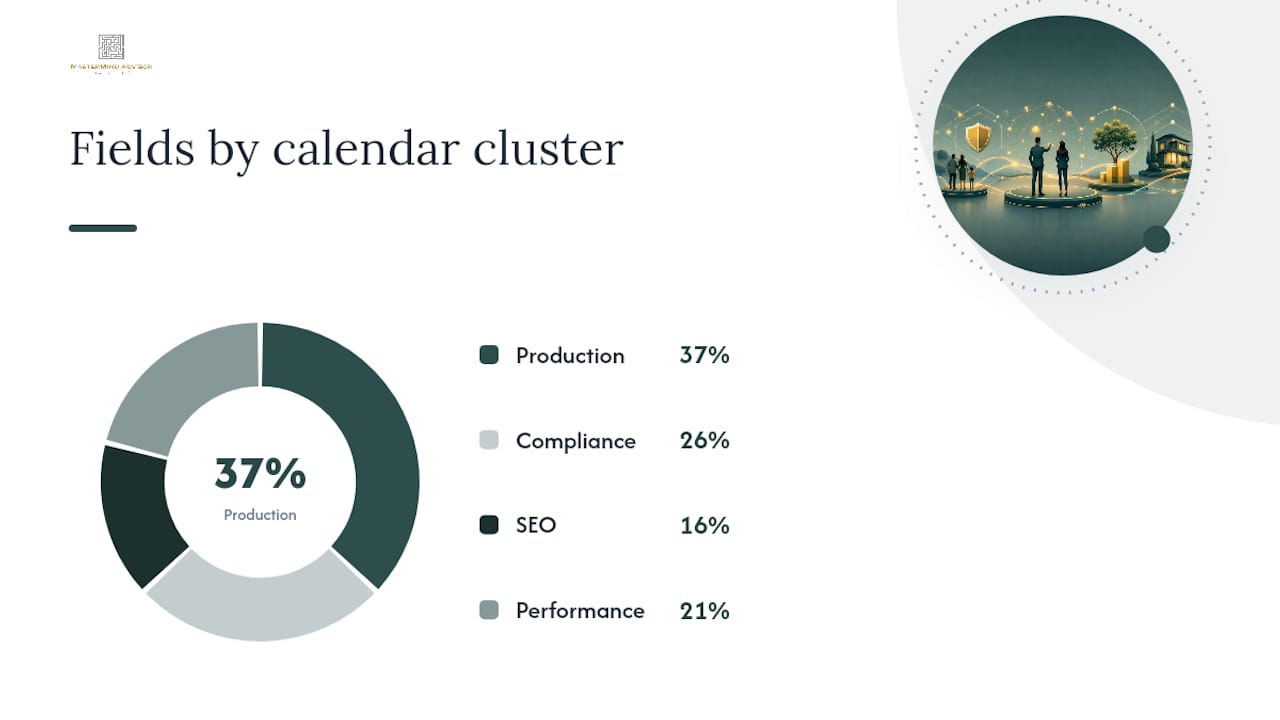
| Plan 1–3 months ahead | Most financial services programs plan one to three months ahead to allow time for creation, compliance review, and promotion. |
| Measure by funnel stage | Tag every piece with a funnel stage and a primary KPI before publishing so you know what success looks like. |
| Mastermindadvisormarketing | Provides pre-built calendar templates, a compliance-friendly content library, and integrated CRM and email automation for independent advisors. |
Table of Contents
- Why advisors need a content calendar more than most marketers do
- What separates content strategy, content plan, and content calendar
- The exact fields your advisor content calendar needs
- How to build your first content calendar, step by step
- How to embed compliance review into every calendar row
- How your social media calendar differs from your editorial calendar
- Sample calendar rows and template views you can copy
- Who owns what: RACI and governance for advisory firms
- When to use a spreadsheet vs. a dedicated editorial platform
- How to measure content performance and keep evergreen assets current
- Your 30–90 day starter plan
- 1. Days 1–30: Set up the system
- 2. Days 31–60: Test the workflow
- 3. Days 61–90: Measure and adjust
- The compliance bottleneck is a calendar design problem, not a compliance problem
- How Mastermindadvisormarketing accelerates your calendar setup
- Sources
Why advisors need a content calendar more than most marketers do
Most marketing advice treats a content calendar as a nice-to-have. For financial advisors, it's closer to a compliance necessity. Here's why the stakes are different.
Business benefits:
- Consistent publishing builds the kind of trust that converts prospects into clients over a long buying cycle. Advisors who publish on a predictable schedule are easier to find, easier to remember, and easier to refer.
- A calendar forces you to plan seasonal content around tax deadlines, open enrollment, and year-end reviews, which are the exact moments clients are most receptive.
- Scheduled content feeds your email drip campaigns and social channels without requiring you to create something new every week.
- Documented publishing history supports content marketing for advisors that builds long-term SEO authority and organic lead flow.
Operational benefits:
- Team accountability becomes concrete when every piece has a named owner and a due date.
- Predictable workloads let you batch content creation, reducing the cognitive overhead of deciding what to write next.
- Distribution planning (email, social, paid) can be coordinated in advance rather than scrambled together after publication.
Regulatory benefits:
- Built-in compliance review windows prevent the last-minute scramble that leads to errors or unapproved posts.
- A calendar creates an auditable record of what was reviewed, who approved it, and when, which is exactly what FINRA and SEC examiners look for during reviews.
Smart Insights frames content calendars as a later step in a broader content-management approach that starts with goals, audience definition, and governance policies. That sequencing matters: a calendar without a strategy behind it is just a list of publish dates.
Quick use cases: A solo advisor running a monthly blog uses the calendar to hold a single publish date sacred. A small RIA sends a quarterly newsletter and maps it to three supporting social posts per week. A multi-advisor firm runs a tax-season campaign across LinkedIn, email, and webinars, all coordinated from one shared calendar.
What separates content strategy, content plan, and content calendar
Advisors often conflate these three documents, which leads to the wrong person owning the wrong decisions. Workspace In draws the distinction clearly: strategy answers why and what, a plan answers how, and a calendar manages when and who.
The strategy tells you to target pre-retirees with retirement income content. The plan identifies the specific topics and formats for the next quarter. The calendar assigns a writer, a compliance reviewer, a publish date, and a status field to each piece. All three documents are necessary; none replaces the others.
The exact fields your advisor content calendar needs
A flat list of publish dates is not a content calendar. Urban Geko Design argues that a fintech editorial calendar should function as an editorial operating system, connecting topics, owners, compliance reviewers, keywords, funnel stages, and refresh dates into a single shared view. Here's what that looks like in practice.
Core production fields:
| Field | Purpose | Who fills it | Sample value |
|---|---|---|---|
| Title / working title | Identifies the asset | Writer | "5 Roth Conversion Mistakes to Avoid" |
| Publish date | Anchors the schedule | Marketing ops | March 14, 2026 |
| Channel | Where it publishes | Marketing ops | Blog, LinkedIn, Email |
| Format | Asset type | Writer | Long-form article |
| Owner | Accountable producer | Marketing lead | Sarah M. |
| Status | Production stage | Writer | Draft / In Review / Approved / Live |
| Draft link | Access to working doc | Writer | Google Doc URL |
Governance and compliance fields:
| Field | Purpose | Who fills it | Sample value |
|---|---|---|---|
| Compliance tier | Risk level of content | Compliance reviewer | Tier 1 (educational) / Tier 2 (market commentary) |
| Compliance reviewer | Named approver | Compliance officer | James R., CCO |
| Approval date | Date sign-off received | Compliance reviewer | March 7, 2026 |
| Disclosure text | Required disclaimer | Compliance reviewer | "Past performance is not indicative of future results." |
| Record link | Archived approval doc | Marketing ops | Compliance folder URL |
SEO and search fields:
| Field | Purpose | Who fills it | Sample value |
|---|---|---|---|
| Target keyword | Primary search term | SEO lead | "Roth conversion rules 2026" |
| Meta description | SERP snippet | Writer | Summary |
| Schema candidacy | Structured data type | SEO lead | FAQ, HowTo, Article |
Performance and maintenance fields:
| Field | Purpose | Who fills it | Sample value |
|---|---|---|---|
| Funnel stage | Where it fits in the buyer journey | Marketing lead | Awareness / Consideration / Decision |
| CTA | Desired reader action | Marketing lead | "Download our retirement checklist" |
| Conversion goal | Measurable outcome | Marketing lead | Email signup, consultation request |
| Refresh date | When to revisit for updates | Marketing ops | September 2026 |
Pro Tip: Start with just the seven core production fields and the three governance fields. Add SEO and performance fields in month two, once the team is comfortable with the workflow. Complexity added before the habit is formed kills calendars.
How to build your first content calendar, step by step
Proofcamp recommends planning one to three months ahead to allow time for research, creation, compliance review, and promotion. That horizon is realistic for most advisory firms. Here's how to get there.
Step 1: Set your publishing cadence. Decide how often you'll publish before you decide what you'll publish. Kitces recommends committing to a concrete cadence, such as publishing the second Friday of every month, because the deadline creates the accountability. One blog post per month plus two social posts per week is a sustainable starting point for a solo advisor.
Step 2: Define your content pillars. Pull these from your content strategy. Three to five topic areas (retirement income, tax planning, estate basics, behavioral finance, market commentary) give you enough variety to stay interesting without losing focus.
Step 3: Build your template. Open Google Sheets, Airtable, or Notion and create the fields from the table above. Keep it in one tab for the first quarter.
Step 4: Map seasonal anchors first. Drop in tax deadlines (April 15, October 15 extension deadline), open enrollment windows, year-end planning dates, and any firm events or webinars. These are your fixed points; everything else fills in around them.
Step 5: Populate month one. Assign a title, owner, publish date, channel, and compliance tier to each piece. Leave the approval date and record link blank until the review is complete.
Step 6: Route for compliance. Submit each piece to your compliance reviewer at least five business days before the publish date for Tier 1 content (educational), and ten or more business days for Tier 2 (market commentary, performance references). Log the approval date and store the record.
Step 7: Publish and measure. After the first month, review what published on time, what slipped, and why. Adjust lead times and ownership before populating month two.
Starter checklist for each piece of content:
- Working title and content brief assigned
- Owner confirmed and deadline set
- Compliance tier assigned before writing begins
- Draft submitted to compliance reviewer with required lead time
- Approval date and disclosure text logged
- Publish slot confirmed in CMS or social scheduler
- CTA and conversion goal documented
- Refresh date set in the calendar
For a fuller look at how this fits into a broader marketing calendar for advisors, the linked guide covers annual planning and campaign coordination in more depth.
How to embed compliance review into every calendar row
The most common content calendar failure in advisory firms is treating compliance as a step that happens after the calendar is built. It needs to be inside the calendar from day one. Wolf Financial notes that financial-services social calendars require compliance checkpoints, disclosure fields, and longer review lead times than general marketing calendars, and that applies to every content type, not just social posts.
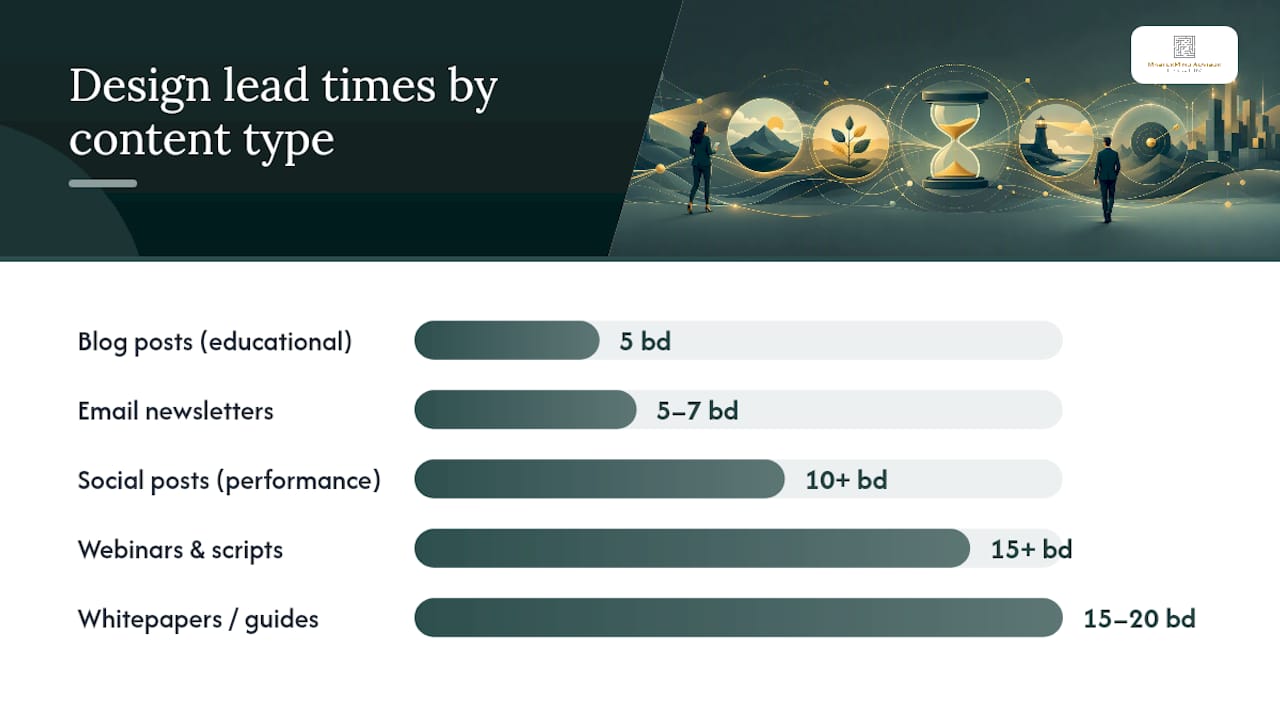
Design lead times by content type:
- Blog posts (educational, no performance data): 5 business days minimum
- Email newsletters: 5–7 business days
- Social posts (market commentary or any performance reference): 10+ business days
- Webinars and seminar scripts: 15+ business days
- Whitepapers or downloadable guides: 15–20 business days
Workflow for each piece:
- Writer completes draft and marks status as "Ready for Compliance Review."
- Compliance reviewer receives notification (email or task in your project tool) and has the assigned lead time to review.
- Reviewer either approves (logs date and initials in the calendar row) or returns with required changes.
- Writer makes changes and resubmits; reviewer confirms final approval.
- Marketing ops updates the approval date, pastes the disclosure text into the calendar row, and stores the archived version in the compliance record folder.
- Piece is cleared to publish.
What to include in the approval record: the final approved version of the content, the reviewer's name and credentials, the approval date, any required disclosures, and the distribution channel. FINRA's rules on communications with the public (FINRA Rule 2210) and the SEC's marketing rule for investment advisers both require firms to maintain records of communications. The calendar row and the linked archive together satisfy that requirement operationally, though you should confirm specifics with your compliance counsel.
Pro Tip: Color-code compliance tiers in your calendar. Tier 1 (educational, no performance data) in green, Tier 2 (market commentary, general claims) in yellow, Tier 3 (performance references, testimonials) in red. At a glance, you can see where your review bottlenecks will be.
A detailed compliance marketing checklist for independent advisors covers the specific documentation steps in more depth.
How your social media calendar differs from your editorial calendar
Your main editorial calendar tracks all content types. Your social calendar is a channel-specific view that pulls from it, with tighter posting frequencies and shorter approval windows for lower-risk content.
Platform cadences that work for advisors:
- LinkedIn: 3–5 posts per week. The highest-ROI platform for advisors. Educational carousels, short market commentary with disclosures, event announcements, and repurposed blog excerpts all perform well.
- Facebook: 2–3 posts per week. Better for community-building and event promotion than lead generation. Client-facing FAQs and educational tips work here.
- Instagram: 2–3 posts per week if you use it. Infographics, short financial tips, and behind-the-scenes firm content. Requires the same compliance review as LinkedIn.
- YouTube: 1–2 videos per month. Video content builds authority faster than text for complex topics like retirement income planning. Longer review lead time required for scripts.
- X (formerly Twitter): Lower priority for most advisors. If you use it, stick to educational content and avoid real-time market commentary without pre-approved disclosures.
Compliance-safe post formats for advisors:
- Educational tips with no performance claims ("Three questions to ask before converting to a Roth IRA")
- Event invitations for webinars or seminars
- Client-facing FAQs repurposed from your blog
- Market commentary with required disclosures pre-approved by compliance
- Firm news and team spotlights
- Curated third-party content with attribution (check your firm's policy on sharing external content)
Sample weekly social queue (linked to one blog post):
- Monday: Teaser quote from the blog post (LinkedIn)
- Wednesday: Key stat or tip from the post with a link (LinkedIn + Facebook)
- Friday: Short video clip or graphic summarizing the post's main point (LinkedIn + Instagram)
- Following Monday: Repurpose as a client-facing FAQ (LinkedIn)
Wolf Financial's social calendar guide recommends building approval windows into the social queue itself, not just the blog workflow, so that social posts tied to market events have pre-approved language ready before the event occurs.
Sample calendar rows and template views you can copy
Three views cover most advisory firms' needs. The monthly editorial view shows all content for the month at a glance, organized by publish date. The weekly production view shows what's due in the next seven days, who owns it, and what stage it's in. The social queue view shows the next two weeks of social posts by platform, with approval status visible.
Sample calendar rows (filled in):
- Blog post: Title: "Year-End Tax Planning Checklist for 2026" | Publish date: November 7, 2026 | Channel: Blog + Email | Owner: Sarah M. | Status: In Review | Compliance tier: Tier 1 | Reviewer: James R. | Approval date: October 30, 2026 | Funnel stage: Awareness | Refresh date: October 2027
- LinkedIn post: Title: "Three questions to ask before year-end" | Publish date: November 3, 2026 | Channel: LinkedIn | Owner: Sarah M. | Status: Approved | Compliance tier: Tier 1 | Reviewer: James R. | Approval date: October 28, 2026
- Webinar: Title: "2026 Year-End Planning Webinar" | Publish date: November 19, 2026 | Channel: Zoom + Email | Owner: Tom K. | Status: Draft | Compliance tier: Tier 2 | Reviewer: James R. | Approval date: November 4, 2026 | CTA: "Book a consultation"
- Email newsletter: Title: "November Client Update: What Changes in 2027" | Publish date: November 14, 2026 | Channel: Email | Owner: Sarah M. | Status: Approved | Compliance tier: Tier 1 | Reviewer: James R. | Approval date: November 7, 2026
Pro Tip: Build your template in Google Sheets first. Once you've run it for one quarter and know which fields you actually use, migrate to Airtable or a dedicated editorial platform. Starting in a sheet keeps the barrier to entry low and lets you iterate without committing to a tool.
For advisors who want a ready-made starting point, the content calendar planning guide from Babylove Growth walks through a general operational template you can adapt for advisory workflows.
Who owns what: RACI and governance for advisory firms
A content calendar without named owners becomes a shared document that nobody updates. Assign roles before you launch.
Recommended RACI:
- Content strategist (Responsible + Accountable for strategy layer): Sets pillars, approves topic mix, owns the content plan. Usually the principal advisor or marketing lead.
- Writer / content producer (Responsible for drafts): Produces the content, fills in production fields, submits for review on time.
- Subject matter expert / SME (Consulted): The advisor who reviews for accuracy before compliance review. Not the same as the compliance reviewer.
- Compliance reviewer (Responsible for approval): Reviews for regulatory accuracy, required disclosures, and firm policy. Logs approval in the calendar row.
- Marketing ops / coordinator (Responsible for scheduling and publishing): Manages the calendar itself, confirms publish slots, routes notifications, and archives records.
Approval SLAs by content type:
- Tier 1 (educational): SME review within 2 business days, compliance review within 3 business days
- Tier 2 (market commentary): SME review within 2 business days, compliance review within 5 business days
- Tier 3 (performance references): SME review within 3 business days, compliance review within 10 business days
Meeting cadences to keep the calendar alive:
- Weekly: 15-minute production standup (what's publishing this week, what's blocked)
- Monthly: 30-minute editorial planning meeting (populate next month, review last month's performance)
- Quarterly: 60-minute strategy review (adjust pillars, refresh evergreen content, update KPIs)
Handoff rules: No piece moves from "Draft" to "In Review" without a completed content brief and SME sign-off. No piece moves from "In Review" to "Approved" without a logged compliance approval date and disclosure text. Marketing ops is the only role that changes status to "Live."
When to use a spreadsheet vs. a dedicated editorial platform
The right tool depends on team size and content volume, not on what sounds most sophisticated.
Use a spreadsheet (Google Sheets, Excel) when:
- You're a solo advisor or a two-person team
- You publish fewer than eight pieces of content per month
- You don't need automated notifications or approval routing
- You want to start immediately without a procurement process
Use a dedicated editorial platform (Airtable, CoSchedule, Notion, or a CMS-native tool) when:
- Multiple people need to update the calendar simultaneously
- You need automated status notifications and approval routing
- You want to filter by channel, owner, or compliance tier without manual sorting
- You need an exportable audit log for compliance records
Integration priorities, in order:
- CMS integration: Connect your calendar to WordPress or your website platform so publish dates sync automatically. The Editorial Calendar plugin for WordPress provides a drag-and-drop visual interface for scheduling posts and tracking status directly inside your CMS.
- CRM integration: Route content-driven leads (webinar signups, content downloads) directly into your CRM so follow-up sequences trigger automatically.
- Social scheduler: Connect to a social scheduling tool so approved posts publish without manual intervention on the day.
- Compliance archive: Link each calendar row to a shared compliance folder (Google Drive, SharePoint) where approved versions are stored.
- Analytics: Connect Google Analytics or your email platform's reporting to track content performance against the KPIs in your calendar.
Lightweight automation worth setting up early: a Zapier workflow that notifies the compliance reviewer by email when a calendar row's status changes to "Ready for Review," and a calendar sync that adds publish dates to your team's shared Google Calendar. Both take under an hour to configure and eliminate the most common missed-deadline failure mode.
For a broader look at how these tools fit into a digital marketing strategy for financial services, the linked guide covers channel integration and measurement in more depth.
How to measure content performance and keep evergreen assets current
A calendar that doesn't connect to measurement is just a publishing schedule. Tag every piece of content in your calendar with a funnel stage and a primary KPI so you know what success looks like before you publish.
KPIs by funnel stage:
- Awareness (blog, social, video): Organic traffic, social reach, time on page, new visitors
- Consideration (email, webinar, downloadable guides): Email open rate, click-through rate, webinar registrations, content downloads
- Decision (consultation landing pages, case studies, testimonials): Consultation requests, form completions, conversion rate
Refresh schedule for evergreen content:
Reporting cadence:
- Monthly: Review traffic, email opens, and lead volume for the prior month's content. Flag underperformers for refresh.
- Quarterly: Review conversion metrics (consultation requests, webinar-to-meeting conversion). Adjust content mix based on what's generating pipeline.
- Annually: Full content audit. Identify evergreen pieces to refresh, thin content to consolidate, and gaps to fill in the next year's content plan.
Pro tip for measurement: Add a "Performance notes" column to your calendar and update it 30 days after each piece publishes. A single sentence ("Ranked page 2 for target keyword; refresh planned for Q3") keeps institutional knowledge inside the calendar rather than scattered across analytics dashboards.
Your 30–90 day starter plan
This plan assumes you're starting from zero: no calendar, no formal content process, and a compliance reviewer who needs to be looped in. Adjust timelines if you already have some infrastructure.
1. Days 1–30: Set up the system
| Milestone | Owner | Success metric | Time estimate |
|---|---|---|---|
| Define publishing cadence and content pillars | Principal advisor | Written cadence decision documented | 2 hours |
| Build calendar template with all required fields | Marketing ops | Template live in Google Sheets or Airtable | 3 hours |
| Brief compliance reviewer on workflow and lead times | Marketing lead | Compliance reviewer confirms SLAs in writing | 1 meeting |
| Populate month one with titles, owners, and publish dates | Marketing ops | All month-one slots filled | 2 hours |
| Submit first piece for compliance review | Writer | Piece submitted with required lead time | Per cadence |
2. Days 31–60: Test the workflow
| Milestone | Owner | Success metric | Time estimate |
|---|---|---|---|
| Publish first two pieces on schedule | Marketing ops | Both pieces live on planned publish dates | Ongoing |
| Log first compliance approvals in calendar | Compliance reviewer | Approval dates and disclosures recorded for all live pieces | Per piece |
| Set up CRM and social scheduler integrations | Marketing ops | Leads routing correctly; social posts publishing automatically | 4–6 hours |
| Run first monthly editorial planning meeting | Marketing lead | Month two fully populated in calendar | 30 minutes |
3. Days 61–90: Measure and adjust
| Milestone | Owner | Success metric | Time estimate |
|---|---|---|---|
| Pull first performance report | Marketing ops | Traffic, email opens, and leads documented for month one | 2 hours |
| Identify one underperforming piece for refresh | Marketing lead | Refresh date set in calendar | 30 minutes |
| Add SEO and performance fields to calendar | Marketing ops | All live pieces tagged with funnel stage and KPI | 2 hours |
| Conduct 90-day retrospective | Full team | Documented process improvements for quarter two | 1 meeting |
Pro Tip: Don't try to build the perfect calendar before you publish anything. Commit to one piece of content in week one, route it through compliance, publish it, and log the approval. That single completed cycle teaches you more about your firm's workflow than any planning session.
Kitces.com makes the same point: start simple, enforce deadlines, and let governance complexity grow only after the calendar consistently delivers results for one quarter.
For a step-by-step look at building a financial planning blog that generates leads alongside your calendar, the linked guide covers content brief structure and publishing cadence in detail.
The compliance bottleneck is a calendar design problem, not a compliance problem
Most advisors who tell me their content program stalled because "compliance slowed everything down" actually have a calendar design problem. The compliance team didn't slow them down. The calendar had no compliance fields, no lead times, and no named reviewer, so every piece arrived at the compliance desk as a surprise. The reviewer, reasonably, took the time they needed. The advisor, reasonably, felt frustrated. Nobody was wrong. The system was just missing.
The fix is almost always the same: add a compliance tier field, assign a named reviewer, and build the lead time into the publish date calculation from the start. When compliance knows what's coming two weeks out, reviews happen faster because the reviewer can plan their workload. When the calendar includes a disclosure text field, the reviewer doesn't have to write the disclaimer from scratch every time. These are calendar design choices, not compliance culture changes.
The other thing advisors underestimate is how much a calendar protects the compliance team. A documented approval trail, with dates and archived versions, is exactly what a FINRA examiner wants to see. Compliance officers at advisory firms often become the calendar's strongest advocates once they realize it makes their job easier, not harder.
Build the calendar for compliance first. The marketing benefits follow automatically.
How Mastermindadvisormarketing accelerates your calendar setup
Independent advisors who want a working content calendar without spending months building one from scratch have a faster path available. Mastermindadvisormarketing delivers a turnkey marketing system that includes a compliance-friendly content library, pre-built calendar templates mapped to advisor workflows, scheduled social media content, automated email drip campaigns, and webinar and seminar support, all designed around the regulatory realities of U.S. financial advisory firms.
The difference between building this yourself and working with Mastermindadvisormarketing is roughly the difference between designing your own compliance workflow from a blank spreadsheet and starting with a system that already has the fields, the lead times, the approval routing, and the content library pre-configured for your firm type. The calendar templates are ready on day one. The compliance-friendly content is already written. The CRM and email automation are already integrated. If you're ready to field-test a calendar that actually runs, visit Mastermindadvisormarketing to see how the system works for independent advisors.
Sources
- Planning for success: how to use a content calendar
- Content strategy vs content plan vs content calendar
- Editorial calendar and template for financial advisor blogging
- Fintech Content Editorial Calendar: Build Your Editorial OS
- Financial Services Social Media Calendar: Ultimate Planning Guide For Finance Marketing
- Managing content marketing in Financial Services | Smart Insights
- Content calendar — Proofcamp glossary
- Wordpress