

Your Google Business Profile is the single most powerful free tool available for local client acquisition, and most financial advisors are barely using it. Verified and complete profiles are 2.7 times more trusted by prospects and generate about 200 monthly interactions, including calls, website visits, and direction requests. That is not a minor edge. For an independent advisor competing in a local market, it is the difference between showing up and being invisible.
A Google Business Profile (also called GBP, formerly Google My Business) is a free listing that controls how your firm appears across Google Search and Google Maps. When someone searches "financial advisor near me" or "retirement planning in [your city]," Google surfaces local profiles before organic website results. Yours needs to be there, complete, and optimized.
Here is what a well-managed profile does for you:
- Appears in Google Search and Maps for high-intent local queries
- Builds immediate credibility with accurate contact info, photos, and hours
- Provides direct action buttons ("Call," "Visit Website," "Get Directions") that convert without requiring a website visit
- Displays client reviews that prospects read before reaching out
- Generates measurable engagement data through Google's built-in analytics
The compliance layer matters too. Financial advisors operate under SEC and FINRA oversight, which shapes how you handle reviews and what you can say in your profile. This guide covers every step, from claiming your listing to managing reviews compliantly, so you can build a profile that works hard for your practice in 2026.
How to claim and set up your financial advisor Google Business Profile

Getting your profile live is straightforward, but a few early decisions have lasting consequences for your local SEO for financial advisors. Do this right the first time.
Eligibility first. Google requires face-to-face client interaction to qualify for a Business Profile. If you meet clients in your office or visit them at their homes or businesses, you qualify. Online-only advisory firms with no physical or service-area presence do not.
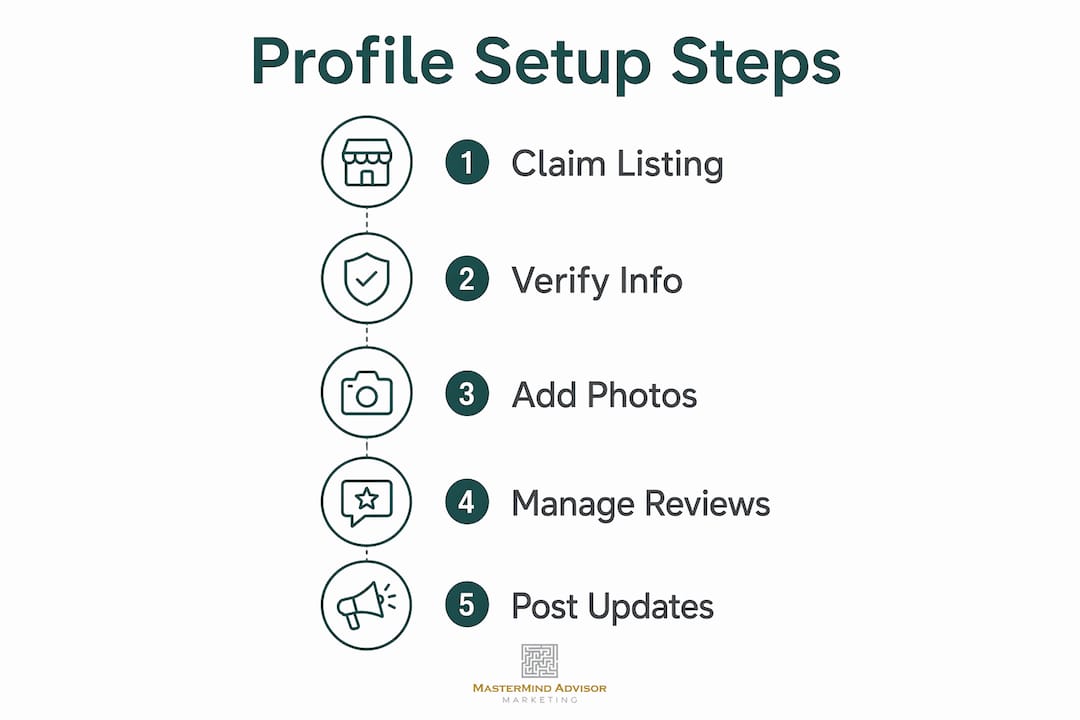
Step-by-step setup:
- Go to google.com/business and sign in with your Google Account. Use your business email if you have one; it makes profile management cleaner.
- Search your firm's exact name. If a listing already exists (Google sometimes auto-generates them), claim it rather than create a duplicate.
- If someone else has verified the listing, request ownership transfer through Google's process.
- Choose your business category carefully. "Financial Planner," "Financial Advisor," "Financial Consultant," and "Investment Service" are all valid options. Pick the one that most precisely describes your practice, then add secondary categories.
- Enter your physical address or configure a service area if you work from home or visit clients.
- Verify ownership. Google offers phone, email, or postcard verification. Postcard takes 5–14 days; phone or email is faster when available.
- Complete every section before you consider the profile live: services, description, photos, hours, and website URL.
Pro Tip: Never create a second listing if one already exists. Duplicate listings confuse Google's algorithm and can suppress both profiles. Always claim and merge.
One early mistake advisors make is selecting a category that sounds impressive but does not match how clients actually search. "Wealth Management" is not a Google category. "Financial Planner" is. Category selection directly affects your relevance score in local search, so match the label to your actual practice.
How to write a compelling description and choose the right photos
Your business description and photos are the first impression a prospect gets before they ever call you. Both need to communicate professionalism and trust without crossing into performance claims that could trigger compliance issues.

Writing your description. Google gives you 750 characters. Use them to explain what you do, who you serve, and what makes your practice worth a call. Mention your specializations (retirement planning, estate planning, tax strategies), your geographic focus, and any credentials like CFP or CFA. Avoid performance claims, guarantees, or anything that reads like an advertisement. Every Google Business Profile description counts as marketing material under SEC recordkeeping rules, so write it as if your compliance officer will review it, because they should.
What to include and what to avoid:
- Do mention specific services: "Retirement Planning," "Investment Management," "Tax Strategies"
- Do name your target client: "We serve pre-retirees and business owners in the greater Denver area"
- Do include credentials and years in practice
- Don't make performance claims or reference past returns
- Don't keyword-stuff. "Top Financial Advisor Denver Retirement Planning" violates Google's Terms of Service and risks suspension
- Don't copy your website's about page verbatim. Write for the person scanning a search result, not a full website visitor
Photos. Profiles with photos get more clicks, period. Add a high-resolution logo, a professional headshot, and at least two or three photos of your office interior. If you have a team, include a group photo. Certification or award plaques photographed cleanly also work well. Update photos at least once a year so the profile looks active.
One underused tactic: add an image of a compliant client testimonial (with required SEC disclosures included in the graphic) as a photo upload. Google does not restrict this, and it puts social proof directly in your profile without triggering the entanglement concerns that come with responding to reviews.
Why accurate contact information is the foundation of your profile
Incomplete or inconsistent contact details do two things simultaneously: they frustrate prospects who cannot reach you, and they suppress your local search ranking. Neither is acceptable.
NAP consistency means your Name, Address, and Phone number must be identical everywhere your firm appears online. Your website, Google Business Profile, LinkedIn, NAPFA directory, BrokerCheck, Yelp, and every other listing need to match character for character. "Suite 200" on your website and "Ste. 200" on Google is an inconsistency. Google's algorithm reads them as different locations.
Contact information checklist:
- Business name matches your legal firm name exactly
- Local phone number with area code (not an 800 number; local numbers strengthen geographic relevance signals)
- Physical address formatted consistently across all platforms
- Website URL pointing to your main site or a location-specific landing page
- Business hours current and accurate, including holiday hours updated in advance
- Appointment link added if you use an online scheduling tool
One detail advisors frequently overlook: use a local phone number rather than a toll-free line. Google uses local area codes as a signal that your practice genuinely serves that community. An 800 number weakens that signal.
Pro Tip: Audit your NAP data across major directories every six months. Search your firm name on Google, check BrokerCheck, NAPFA, and your state's advisor directory, and fix any discrepancy immediately. One wrong address on a high-authority site can drag down your entire local ranking.
How to manage Google reviews compliantly and effectively
Reviews are where most advisors either win big or create regulatory exposure. The SEC's updated marketing rule, effective november 2022, permits the use of testimonials and endorsements, including Google reviews, but the compliance requirements are specific and non-negotiable.
The core compliance principle. Selective solicitation is the primary risk. Asking only your happiest clients for reviews, or coaching clients on what to say, risks turning those reviews into regulated advertisements subject to full disclosure requirements. The safe approach is to request reviews from all clients equally, without guiding their responses. This is what the SEC's stated intent supports: unbiased, candid client feedback.
Approximately 77% of all Google reviews come from just 20% of financial advisory firms. The firms at the top are not lucky. They have a proactive, systematic process for asking every client.
Best practices for compliant review collection:
- Send review requests via email to your full client list, not a curated subset
- Include your direct Google review link so clients do not have to search for your firm
- Do not script what clients should say. Ask for honest feedback
- Do not respond publicly to reviews. Responding can trigger "adoption" under SEC rules, which reclassifies the review as your own advertisement
- Report fake or inappropriate reviews to Google, but do not expect quick removal unless they clearly violate Google's terms
72% of financial advisory clients consider Google reviews a top selection factor. Google Maps also automatically filters results to show only businesses rated 4 stars and above for searches like "best financial advisor near me." If your advisor profile falls below 4.0, you disappear from those results regardless of your experience or credentials.
A steady, consistent flow of authentic reviews over time looks more credible to Google than a sudden spike. Build review generation into your client communication calendar, not as a one-time campaign.
Pro Tip: Ask clients to leave their review from their home or workplace, not from your office. Google uses review location data to validate geographic authenticity. A review submitted from a client's home address carries more weight and is less likely to be filtered as spam than one submitted from your office Wi-Fi.
For a deeper look at building a compliant review strategy, the advisor review strategy guide covers the full process.
How to configure service areas if you visit clients or work remotely
Not every financial advisor operates from a traditional office that clients walk into. If you visit clients at their homes or businesses, or if you work from a home office you prefer not to publicize, Google's service area settings let you maintain a profile without displaying your address.
The eligibility rule still applies. You must interact with clients face-to-face to qualify. A purely virtual practice with no in-person meetings does not meet Google's criteria, regardless of how you configure the service area.
Setting up service areas:
- In your Google Business Profile dashboard, navigate to "Business location" settings
- Choose to hide your address if you work from home or prefer not to display it
- Add service areas by city, county, or zip code to define where you operate
- Google recommends limiting service areas to regions you can realistically reach within about two hours
Trade-offs of hiding your address. Businesses with visible physical addresses consistently outrank those with hidden addresses in local search. If you have a legitimate office location, displaying it gives you a ranking advantage. If you work from home and privacy is a concern, hiding the address is the right call, but understand the visibility cost.
Tips for maximizing local relevance with a service area profile:
- List every city or county where you actively serve clients
- Make sure your website has location-specific content that matches your service areas
- Use your local phone number (with area code) even without a displayed address
- Keep service area boundaries realistic. Claiming a 200-mile radius when you serve a single metro area dilutes your relevance signals
Advanced strategies to get more from your Google Business Profile
Once the basics are solid, several features inside Google Business Profile can meaningfully increase your visibility and engagement. Most advisors set up their profile and forget it. That is a missed opportunity.
Google Posts. Think of Posts as a mini-blog feed attached to your profile. Weekly posts drive 41% more engagement than monthly posts, and they signal to Google that your profile is active. A post like "3 questions to ask before choosing a fiduciary advisor in [your city]" costs nothing, takes ten minutes to write, and tells Google's algorithm your listing is current. Write posts that educate rather than sell, and run every post through your compliance review process before publishing.
Google Q&A. The Q&A section lets anyone post a question on your profile, and anyone can answer it, including you. Seed this section yourself by posting the questions prospects most commonly ask ("Do you work with clients outside [city]?" or "What is your minimum investment?") and answering them clearly. Left unmanaged, this section can fill with unanswered questions or, worse, incorrect answers from strangers.
Google Insights. Your profile dashboard shows how many people searched for your firm directly versus discovered you through a category search, how many clicked to call, and how many requested directions. Track these monthly. If direction requests are high but calls are low, your profile is attracting local interest but not converting it. That gap usually points to a weak description or too few reviews.
Integration with your broader online presence. Your website's SEO performance directly affects your Google Business Profile ranking. Title tags, page speed, mobile-friendliness, and domain authority all feed into local search results. The URL you connect to your profile should point to a page with your location, services, and contact information clearly stated. For advisors covering multiple markets, location-specific landing pages on your website strengthen the geographic signals Google uses to rank your profile.
Pro Tip: Link your Google Business Profile to your local SEO strategy so both reinforce each other. A profile with strong reviews and a website with strong local content compound over time in a way that paid ads never do.
Handling suspensions. Google can suspend a profile for keyword stuffing in the business name, address inconsistencies, or suspected policy violations. If your profile gets suspended, file a reinstatement request through Google's Business Profile support, provide documentation of your business (utility bill, business license), and correct whatever triggered the suspension before reapplying. Prevention is simpler: keep your business name clean, your address consistent, and your category accurate.
Updating hours for holidays. Use Google's "Special hours" feature to update your schedule for federal holidays, office closures, or extended hours during tax season. Profiles that show accurate hours build trust. A prospect who calls during what Google shows as business hours and gets voicemail is a prospect who moves on to the next listing.
For advisors who want to connect their profile work to a full digital marketing strategy, the compounding effect of consistent profile management, website SEO, and directory citations becomes clear around months 12–18 of sustained effort.
Managing your online reputation extends beyond Google alone. A resource like this online reputation guide for small businesses covers the broader framework for protecting and building your firm's credibility across platforms.
Key Takeaways
A fully optimized financial advisor Google Business Profile, managed compliantly and updated consistently, is the highest-return free marketing asset available to independent advisors in 2026.
| Point | Details |
|---|---|
| Verified profiles build trust fast | Verified and complete profiles are significantly more trusted by prospects and generate substantial monthly interactions. |
| NAP consistency is non-negotiable | Your name, address, and phone number must match exactly across every online directory, or local rankings suffer. |
| Compliant review solicitation requires all clients | Request reviews from your full client list equally; selective solicitation risks triggering SEC marketing rule violations. |
| Weekly posts outperform monthly ones | Profiles posting weekly see 41% more engagement than those posting monthly, signaling freshness to Google's algorithm. |
| Mastermindadvisormarketing extends your reach | Mastermindadvisormarketing's turnkey system pairs with your Google Business Profile to generate leads through webinars, seminars, and automated follow-up. |
Why most advisors are still leaving this opportunity on the table
The conventional wisdom says Google Business Profile is a "set it and forget it" task. Claim the listing, fill in your hours, and move on. That framing is exactly why fewer than 10% of SEC-registered investment advisers are actively using their profiles to generate business.
The advisors who treat their profile as a living marketing asset, posting weekly, collecting reviews systematically, seeding the Q&A section, and monitoring their Insights dashboard monthly, are the ones pulling inbound calls from prospects who have never heard of them. That is a fundamentally different client acquisition channel than referrals, and it compounds in a way referrals do not.
The compliance anxiety around reviews is real but manageable. The SEC's updated marketing rule did not open a minefield; it opened a door. The rule's logic is straightforward: give every client an equal opportunity to leave candid feedback, do not coach them, do not respond publicly, and do not selectively promote favorable reviews. Follow those four principles and you are operating well within the guardrails.
What advisors underestimate is the long-term value of a steady review cadence. Firms that have cracked the code on review generation tend to have higher average ratings than businesses in other industries, partly because financial planning's high client retention rate means most clients who bother to leave a review are genuinely satisfied. The J-curve that dominates online reviews in retail (a handful of 1-stars, a flood of 5-stars, almost nothing in between) plays out even more favorably in financial services.
The advisors who will dominate local search in 2026 are not the ones with the biggest marketing budgets. They are the ones who showed up consistently, kept their profiles accurate, and asked every client for honest feedback.
Mastermindadvisormarketing gives independent advisors a full marketing engine
Your Google Business Profile handles local search visibility, but it does not generate the webinar registrants, seminar attendees, or nurtured prospects that fill a pipeline. That is where Mastermindadvisormarketing fills the gap.

Mastermindadvisormarketing is built exclusively for independent financial advisors, not generic small businesses. The platform combines customized webinars and seminar hosting, content marketing, a custom CRM, and automated email follow-up sequences into one system designed to turn prospects into clients. Where your Google Business Profile captures someone already searching for an advisor, Mastermindadvisormarketing creates demand from prospects who did not know they needed you yet. The two work together: local search visibility brings people in, and a structured follow-up system converts them. Advisors who have used the platform report stronger lead pipelines and a more consistent client acquisition process than they had relying on referrals alone.